
Secure Iframe Guide
Secure Iframe Guide
This guide provides instructions for integrating with the Secure Iframe functionality to display sensitive card information without PCI DSS compliance.
The Secure Iframe feature allows you to retrieve sensitive card details (card number, expiry date, CVV) in a PCI-compliant manner, regardless of your PCI compliance status. This is ideal for merchants who need to display card information to cardholders but do not have PCI DSS certification.
Step 1: Create PAN Token
Use the Create PAN Token API with the card_id parameter.
Request:
curl --location --request POST 'https://api-sandbox.uqpaytech.com/api/v1/issuing/cards/{card_id}/token' \
--header 'x-on-behalf-of;' \
--header 'Accept: application/json' \
--header 'x-auth-token: <your_access_token>' \
--header 'x-idempotency-key: <uuid>'
Response:
{
  "token": "pan_eyJhbGciOiJIUzI1NiIsInR5cCI6IkpXVCJ9",
  "expires_in": 60,
  "expires_at": "2025-11-13T10:31:00Z"
}
Note:
- Each token can only be used once
- Token expires after 60 seconds
Step 2: Prepare Styles (Optional)
You can customize the iframe appearance by providing CSS styles as a JSON object. The styles need be URL-encoded and passed as a query parameter.
const styles = {
    ".uq-card-number": {
        "color": "#2196F3",
        "font-size": "20px",
        "font-weight": "600",
        "font-family": "Arial, sans-serif"
    },
    ".uq-card-expiry": {
        "color": "#4CAF50",
        "font-size": "18px",
        "font-weight": "500"
    },
    ".uq-card-cvv": {
        "color": "#FF9800",
        "font-size": "18px",
        "font-weight": "500"
    },
    ".uq-card-container": {
        "background-color": "#f5f5f5",
        "border-radius": "12px",
        "padding": "20px",
        "border": "1px solid #e0e0e0"
    },
    ".uq-card-label": {
        "color": "#666666",
        "font-size": "14px"
    },
    ".uq-card-button": {
        "background-color": "#2196F3",
        "color": "#ffffff",
        "border": "none",
        "border-radius": "8px"
    },
    ".uq-card-button:hover": {
        "background-color": "#1976D2"
    },
    ".uq-card-tooltip": {
        "background-color": "#d4edda",
        "color": "#155724",
        "font-size": "12px",
        "border-radius": "4px"
    }
};

const encodedStyles = encodeURIComponent(JSON.stringify(styles));
Available CSS Selectors
| Selector | Description | Supported Properties |
|---|---|---|
.uq-card-number | Card number | color, font-size, font-family, font-weight |
.uq-card-expiry | Expiry date | color, font-size, font-family, font-weight |
.uq-card-cvv | CVV | color, font-size, font-family, font-weight |
.uq-card-container | Container | background-color, padding, border, border-radius |
.uq-card-label | Label text | color, font-size |
.uq-card-button | Copy button | color, background-color, border, border-radius, padding |
.uq-card-button:hover | Button hover state | color, background-color |
.uq-card-button:active | Button active state | color, background-color |
.uq-card-tooltip | Copy tooltip | color, background-color, font-size, border-radius |
Supported CSS Properties
Global supported properties: color, background-color, font-size, font-family, font-weight, padding, margin, border, border-radius, text-align, line-height, letter-spacing
Step 3: Construct Iframe URL
Build the iframe source URL using the following pattern:
{iframe_domain}/iframe/card?token={pan_token}&cardId={card_id}&lang={lang}&styles={encoded_styles}Parameters
| Parameter | Type | Required | Description | Example |
|---|---|---|---|---|
iframe_domain | string | Yes | Iframe service domain | https://embedded-sandbox.uqpaytech.com |
pan_token | string | Yes | PAN token from Step 1 | pan_eyJhbGciOiJIUzI1NiIsInR5cCI6IkpXVCJ9 |
card_id | string | Yes | Card identifier (must match token creation) | 7242a504-e43d-4b95-b4c8-f9fc5992d02b |
lang | string | No | Display language (default: en) | en, zh, zh-TW |
styles | string | No | URL-encoded CSS styles JSON | URL-encoded JSON object |
Environment Domains
- Sandbox:
https://embedded-sandbox.uqpaytech.com - Production:
https://embedded.uqpay.com
Example
const iframeDomain = 'https://embedded-sandbox.uqpaytech.com';
const panToken = 'pan_eyJhbGciOiJIUzI1NiIsInR5cCI6IkpXVCJ9';
const cardId = '7242a504-e43d-4b95-b4c8-f9fc5992d02b';
const lang = 'en';
const styles = {
  ".uq-card-container": {
    "background-color": "#ffffff",
    "border": "1px solid #e0e0e0",
    "border-radius": "8px"
  }
};

const encodedStyles = encodeURIComponent(JSON.stringify(styles));
const iframeUrl = `${iframeDomain}/iframe/card?token=${panToken}&cardId=${cardId}&lang=${lang}&styles=${encodedStyles}`;
Step 4: Embed Iframe on Your Page
Add the iframe element to your HTML page:
<iframe
  src="${iframeUrl}"
  width="400"
  height="200"
  frameborder="0"
></iframe>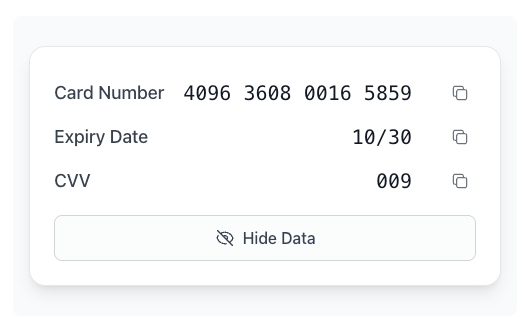
Sandbox tool for quick testing: https://embedded-sandbox.uqpaytech.com/iframe/preview/
Updated 4 months ago